HAMCRATE
RX TX 14.078 MHz · CHAT & MESSAGING
Chat & messaging · #1 by votes

Updated 12 Nov 2026

Downloads · v1.0.17 stableReleased 8 Nov 2026
Windows · x86_64
modem73-windows-x86_64.exe
16.9 MB SHA-256 f5b10ed77fb77df828b5535d3bc2727d56675ce1528c94c012680b104edcad89 via GitHub
Download
Windows · x86_64
wcr-windows-x86_64.zip
19.7 MB SHA-256 fbb264806ba1654b0354b46cb6c2fd1b273c66c4a2536863a708cd9521e9b2e0 via GitHub
Download
macOS · arm64
modem73-macos-aarch64.tar.gz
1.9 MB SHA-256 909cc46a3ac6da946a79b2ab6c77f514119bf4f87b57fe77d2ddd3e4dba9857c via GitHub
Download
macOS · x86_64
modem73-macos-x86_64.tar.gz
2.2 MB SHA-256 21d9b8e60b30815b7536d8bb9b722b18e29d7253ce97aab11a399542f8957c8d via GitHub
Download
macOS · arm64
wcr-macos-aarch64.tar.gz
17.8 MB SHA-256 41dc594b57a0c63a4af202fa5580aca57de7654cbfacb172447b460b4383a5b5 via GitHub
Download
macOS · x86_64
wcr-macos-x86_64.tar.gz
18.5 MB SHA-256 8b24beff212532cac9a653ef31cb491b90b29b744f17731fb89088b87869c641 via GitHub
Download
Linux · x86_64
modem73-linux-x86_64
1.6 MB SHA-256 67fae4854cf316c4d4fdae2007bf4d14da13768f843424c2149e829744a9c79a via GitHub
Download
Linux · x86_64
wcr-linux-x86_64.tar.gz
20.1 MB SHA-256 4ab933b30de6c15cc01c09d9965d51738b6b941f2e5c7ac660732946f715b86d via GitHub
Download
Raspberry Pi · arm64
modem73-linux-aarch64
1.5 MB SHA-256 666998baba0a9e868f46586a1a65c36250406efa06e3359e8ad47a54a24ef214 via GitHub
Download
Raspberry Pi · arm64
wcr-linux-aarch64.tar.gz
19.9 MB SHA-256 53f2b634defa0c0c101813d6fc120b1ca821aacf14d7951797aecdcd1233f6fa via GitHub
Download

Developer's own installer / download page →

Release candidate v1.0.18-rc3 · for testers · 12 Nov 2026
Windows · x86_64
modem73-windows-x86_64.exe
16.9 MB SHA-256 7169f4d01e1de2217b06d03bf64ab49d31341745fd50f58cb5afa54c2605bf3b via GitHub
Download
Windows · x86_64
wcr-windows-x86_64.zip
19.7 MB SHA-256 e446a4af9852b50551fb40fbc496bb8c604593df8b64baecb154197626f8f876 via GitHub
Download
macOS · arm64
modem73-macos-aarch64.tar.gz
1.9 MB SHA-256 e515056960810c2ad2340f3eec3de0f96066d651be834de3dc7d0065d8d32fbf via GitHub
Download
macOS · x86_64
modem73-macos-x86_64.tar.gz
2.2 MB SHA-256 3914a2d661dc6cd482b403a6d0fb8c405bfc3ec4e4d5e910429d4e5709aa663c via GitHub
Download
macOS · arm64
wcr-macos-aarch64.tar.gz
17.8 MB SHA-256 7be061e6ccab0dcdeba03dc91e882f6cc692da88ca91fa8c5dff52a179e18109 via GitHub
Download
macOS · x86_64
wcr-macos-x86_64.tar.gz
18.6 MB SHA-256 718e447ce13ab7792550d26cf828b57de95efafb17178ae24e1825676752132b via GitHub
Download
Linux · x86_64
modem73-linux-x86_64
1.6 MB SHA-256 11c628a66735c11512e393fd5049a96e5264474ce75192dc954d9d188a84d4aa via GitHub
Download
Linux · x86_64
wcr-linux-x86_64.tar.gz
20.2 MB SHA-256 6373b7d364843df36f8232489acd12e6594dbef90a91479d298dfe1822caaae9 via GitHub
Download
Raspberry Pi · arm64
modem73-linux-aarch64
1.5 MB SHA-256 19e879f6a78fba6c74b2c83aa0a9e2f58d23ff024319463cf4073e662dfe2d8a via GitHub
Download
Raspberry Pi · arm64
wcr-linux-aarch64.tar.gz
20.0 MB SHA-256 b9e479ada0bf9f03cd7fcd66c94cf7b84cd581792fc59c1323f0f281017da7aa via GitHub
Download

v1.0.18-rc3 is a release candidate. Get it with wcr update --rc.

What changed since v1.0.18-rc2

Find radio on Linux and Raspberry Pi (#331) - Find radio (desktop app), wcr tnc find and the radio step of wcr setup now work on Linux, including a Raspberry Pi over SSH, for the VR-N76, VR-N7600, UV-PRO and GA-5WB. A radio that is already paired is picked straight away. Otherwise it searches for about 8 s, pairs (it answers PIN 0000 and yes/no prompts) and trusts the radio, so it reconnects by itself. - It uses BlueZ's bluetoothctl, which Raspberry Pi OS already has. When something blocks it, the message names the fix: install bluez, sudo rfkill unblock bluetooth, add your user to the bluetooth group, or start the Bluetooth service. With no Bluetooth adapter it gives up after 10 s instead of waiting forever. - Raspberry Pi 3: Bluetooth shares its antenna with 2.4 GHz Wi-Fi, so use Ethernet if you can and keep the radio within a few metres.

Previous stable versions (2)

v1.0.16 · 6 Nov 2026

Windows · x86_64
modem73-windows-x86_64.exe
16.9 MB SHA-256 91d07673d8c917860416b8962894801d517ceab06e7cc2f8f595570437b5c645 via GitHub
Download
Windows · x86_64
wcr-windows-x86_64.zip
19.6 MB SHA-256 e0255e1e784e2ccdfc25160fd340ab3c4d4dce962dee2aa33eb63646394ac9e1 via GitHub
Download
macOS · arm64
modem73-macos-aarch64.tar.gz
1.9 MB SHA-256 b77f77a691883e1b3e8f31d428d0dbc6de5cacde8daeb274e6bae84d5dcc60f1 via GitHub
Download
macOS · x86_64
modem73-macos-x86_64.tar.gz
2.2 MB SHA-256 09d216093a5588b6fb634aa33154a15f3f9c75765390ec5abf2de060433b3dac via GitHub
Download
macOS · arm64
wcr-macos-aarch64.tar.gz
17.7 MB SHA-256 810d54c016a9b1c201419fce86a2cf3cf429959a58574734aacc2d82bfe212be via GitHub
Download
macOS · x86_64
wcr-macos-x86_64.tar.gz
18.5 MB SHA-256 da5c17b87ec73f73657a6ce4736d3df2548304388b7fd242ed544dc353b89a35 via GitHub
Download
Linux · x86_64
modem73-linux-x86_64
1.6 MB SHA-256 2d02e65b14c30dd0d86436ba468628c884d98a13aadbc6446bda8ccd2108c85d via GitHub
Download
Linux · x86_64
wcr-linux-x86_64.tar.gz
20.0 MB SHA-256 aa2689e16427f3bcdb59fa3b283b9aceedd8e3891d5b6c7559f717d4a5715ca9 via GitHub
Download
Raspberry Pi · arm64
modem73-linux-aarch64
1.5 MB SHA-256 f7876b4e957f50f34d8b8a90d3856863d8d7d74fd5a60a713cd32d0e208737ec via GitHub
Download
Raspberry Pi · arm64
wcr-linux-aarch64.tar.gz
19.8 MB SHA-256 f7490fc0f1220353c83b9b985bee5ec21d7d25480442bc19ea585a8db6096486 via GitHub
Download

v1.0.15 · 4 Nov 2026

Windows · x86_64
modem73-windows-x86_64.exe
16.9 MB SHA-256 9c795a125a1c3c4789dfa6d48846255a9247f327a48bcfb76b9cfe0e592427a0 via GitHub
Download
Windows · x86_64
wcr-windows-x86_64.zip
19.1 MB SHA-256 2efb576cd350070ba8f35f7c979f0e9cec632c40cbf85df82246011bb3716b09 via GitHub
Download
macOS · arm64
modem73-macos-aarch64.tar.gz
1.9 MB SHA-256 13cd5f0f85625d0cb409551416b82448adb5db4a831620b59d6a9e21680e394b via GitHub
Download
macOS · x86_64
modem73-macos-x86_64.tar.gz
2.2 MB SHA-256 97d0cf4dfd7dd3d7e31dee0a3b37ac3659e89d5a13a4cd3cb839054429ea7d21 via GitHub
Download
macOS · arm64
wcr-macos-aarch64.tar.gz
17.3 MB SHA-256 8943f1e9748ac451c41dbd2e3a7534401c72b88437744caa6c4a24e2659c2b19 via GitHub
Download
macOS · x86_64
wcr-macos-x86_64.tar.gz
18.0 MB SHA-256 fa50a04159ef3bb4040cce6c4f3c420c9076cd957e0c86811aa3ba9201ce5366 via GitHub
Download
Linux · x86_64
modem73-linux-x86_64
1.6 MB SHA-256 2af7b3e0112ca2af74c7fc626b4d71c0362d82e261982d938d875f212602833e via GitHub
Download
Linux · x86_64
wcr-linux-x86_64.tar.gz
19.6 MB SHA-256 1980a62d000274bc05daaa2639d4e6714836181ae3866d81177b85f7550e068a via GitHub
Download
Raspberry Pi · arm64
modem73-linux-aarch64
1.5 MB SHA-256 63c1b3d5258f0303204b9b83312c5584b7c2594047a28f4e0478327cc5927d72 via GitHub
Download
Raspberry Pi · arm64
wcr-linux-aarch64.tar.gz
19.4 MB SHA-256 92716f1c8a849b1f1265a88f99352d9016598f7f325cb179c72740a3498ab662 via GitHub
Download

Every file is scanned (ClamAV + VirusTotal) before it appears here. Check the SHA-256 after downloading. No account needed.

Release notes · v1.0.17On GitHub →

v1.0.17 is the final release of the v1.0.17 series: everything from v1.0.17-rc1 to rc3, plus the email progress bars and clickable new-mail alert (#316). Run wcr update to get it. On rc3 or later, press Update on the web page or in the desktop app.

What changed since v1.0.16 (rc1 to rc4)

Email: DOS-style progress bars and a clickable new-mail alert (#316) - Desktop app: the Sending email and Getting email windows show a text bar, such as [████████░░░░░░░░░░░░] 40%, the same look as file transfers. - Pi web page: a Radio+ Get shows a bar above the inbox while chunks arrive; outbox mail on the air shows a bar of the chunks the gateway has, such as 4/6. - Desktop app: when mail arrives, an alert at the top right says "New mail from X: subject" with Open. Click it to go straight to that email. It goes away once the mail is read, or with x. The system notification names the sender and subject. - The Get window has Open once the mail is fetched; so does the Pi page's "Fetched" line.

File transfers: progress bars, Desktop saving, clickable path (#312, rc3) - Both sides show a progress bar, such as [█████████░░░░░░░░░░░] 9/15, in the desktop app and on the Pi web page. - Received files are saved in a WeeChat Radio/CALL folder on the Desktop; a machine with no Desktop (such as a headless Pi) saves them in files/CALL beside the station's data. [store] files_dir picks another folder. - The saved path is a link: the desktop app opens its folder, the Pi page downloads the file.

Small files in direct messages, VHF/UHF only (#308, rc2) - /file CALL path (or /file path in a direct chat) sends a file of up to 4 KB to one station, only on vhf-fm or afsk-1200, only over the radio. [ok] on the file line means the other station has the whole file. - Desktop app: drag a file onto the window in a direct chat; files opens the received files folder. Pi web page: File button in a direct chat.

Desktop app: direct messages notify you and get their own chats (#303, rc1) - A direct message opens a direct chat with its sender (it used to land in a hidden channel). New direct row with "N new" counts; system notifications for each incoming direct message.

/report sends on Enter (#304, rc1) - Picking /report sends straight away. In a direct chat, a bare /report asks that station for a signal report.

Radio+ Auto mail gateway (#313, rc3) - MAIL GW turns green as soon as a gateway acks your mail or answers Check mail. After "No mail gateway heard", the station asks again by itself.

Pi web app (#307, rc2) and polish (#311, rc3) - Leave group and Delete chat on the open conversation. Tidier desktop app and Pi page.

Full Changelog: https://github.com/thaum-labs/weechat-radio/compare/v1.0.16...v1.0.17
Screenshots3 of 6
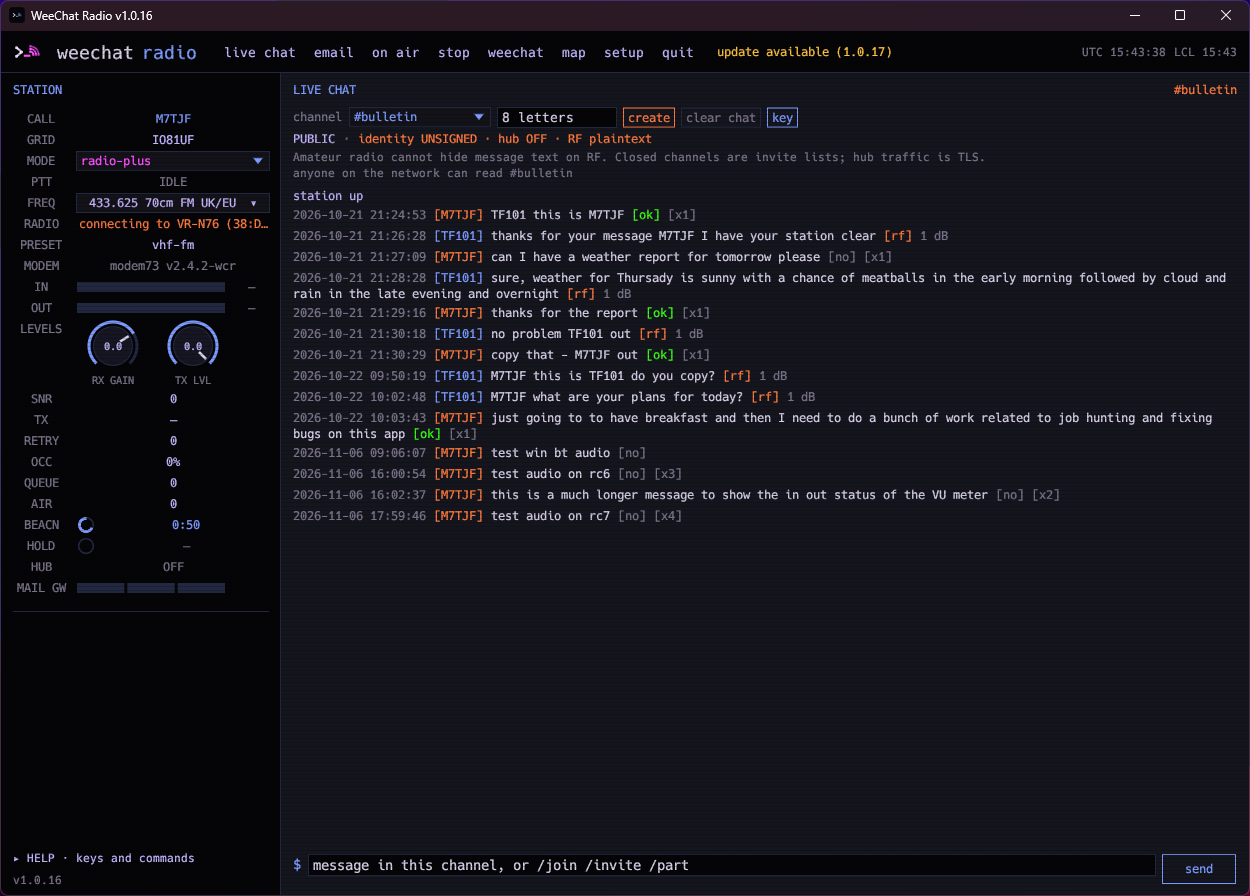
Live chat with the station panel
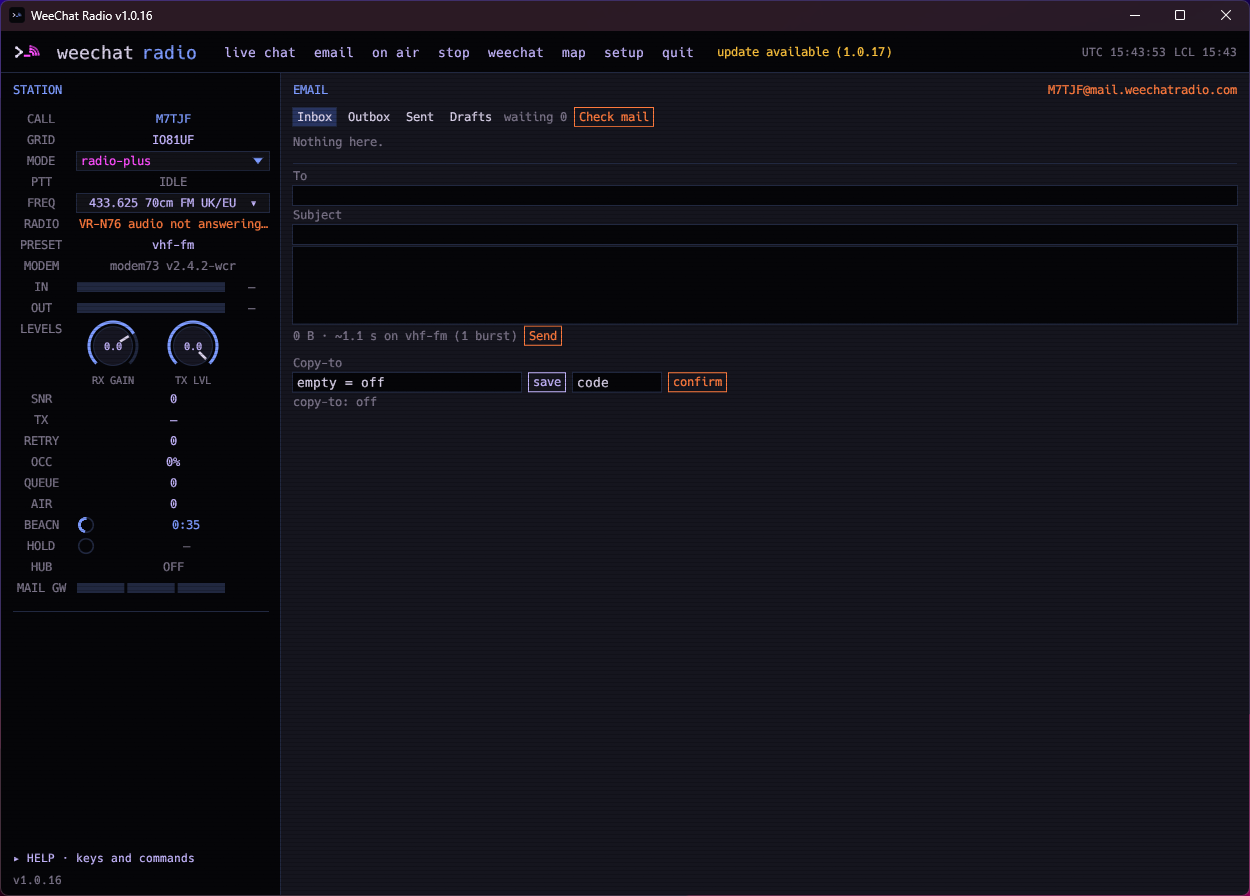
Radio email over VHF
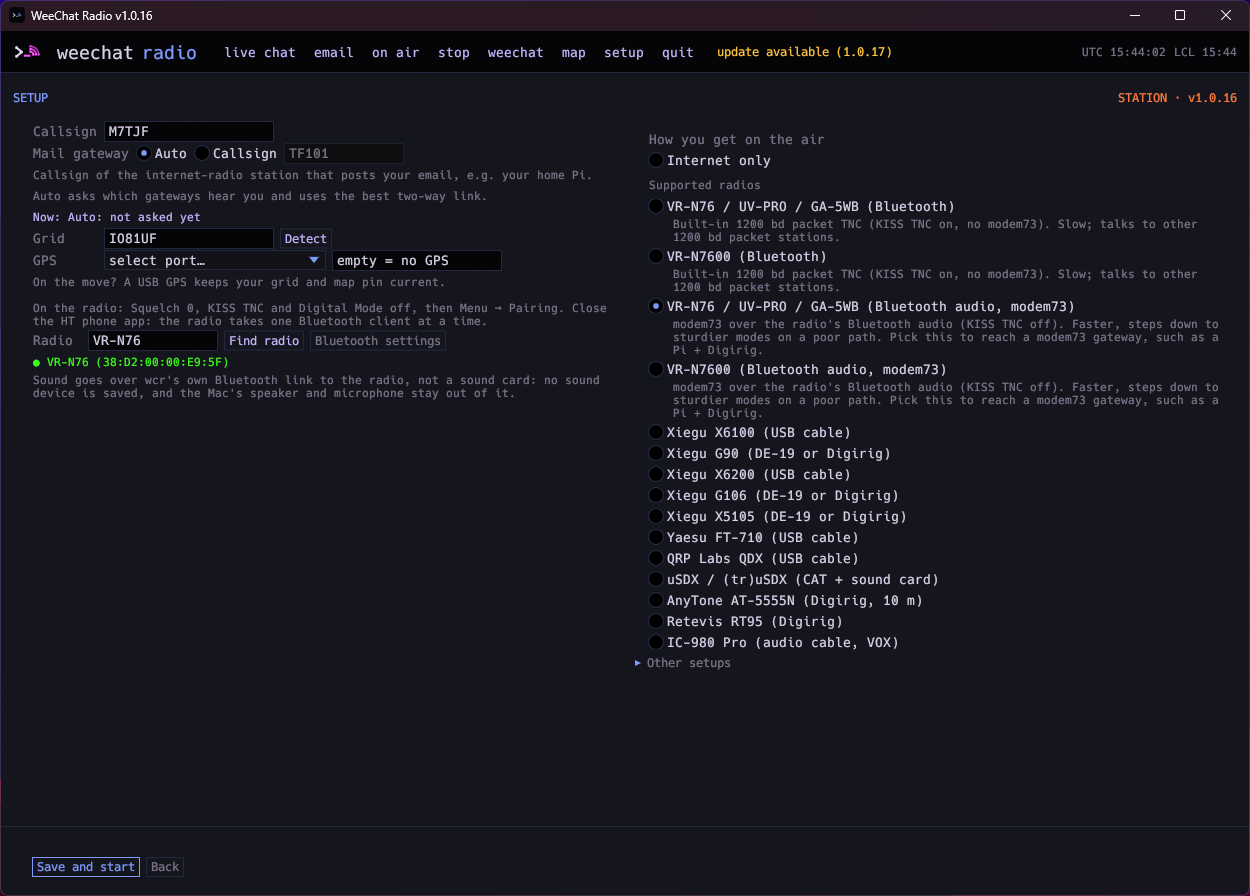
Setup: callsign, gateway and radios
About weechat-radio

wcr is open-source station software for licensed amateur radio operators. It talks to WeeChat like an IRC server and to modem73 like a TNC, so you can send typed chat over HF/VHF/UHF, over the internet, or both. Messages store-and-forward on the air; a station can act as a gateway; email can ride through a heard gateway.

  • Chat from the desktop app (wcr gui), a terminal UI (wcr tui), or WeeChat
  • Modes: radio-only, Radio+, internet-radio (gateway), or internet-only
  • Direct messages, with small file attachments on VHF/UHF
  • Send and receive email over the radio through a gateway station
  • Run an always-on gateway on a Raspberry Pi with a web portal for status, chat and mail

Supported radio paths include Digirig/AIOC handhelds, VOX audio leads, CAT HF rigs, VR-N76 / UV-PRO over Bluetooth, and KISS TNCs. Check your band plan before you transmit.

You do not need WeeChat: the desktop app or TUI is enough. Internet-only mode works without a radio.

WeeChat is a trademark of Sébastien Helleu. This project is independent.